Saturday, 20 April 2019

Choosing What Software to Animate With

Although my animations are only tiny and simple, I really didn't want to cut corners, so I tested out a few animation programmes before deciding on which one was the most suitable for what I wanted. Below are my notes from my experience...

MotionArt-
Pros:
- Experience with it (1st year motion comic).
- Good for very simple movements.
- Clear and easy to use.
Cons:
- Is definitely tailored towards motion comics and not single icons.
- Can be restrictive.
- Difficult to access (my copy keeps crashing and freaking out).

Animate-
Pros:
- Fairly easy to use.
- Not restrictive.
- Very easy to transfer results to other Adobe products (I create the art in photoshop and will be using it in Premier Pro).
Cons:
- I grew up using Flash, which turned into Animate, so I keep trying to use old controls and confusing myself.
- Can take a long time.
- My tablet struggles to run it.

Premier Pro-
Pros:
- Very familiar with it.
- Know how to use it very quickly.
Cons:
- Not actually an animation software.
- Awkward and longwinded.
- No preview option.
- Hard to do small pieces.

Photoshop-
Pros:
- Very familiar with it.
- Quick.
- Can produce animated gifs of any shape.
Cons:
- Can reduce quality.
- Not actual animation software.

I decided to go for Photoshop in the end, as it was the technique I liked to used in my spare time. I know I can use it well, and I'm confident in the results it produces.


Thursday, 21 March 2019

Testing Different Title Slide Designs

Something I've really enjoyed this semester has been coming up with the design elements of my work. And something I've always had a huge passion for is typography, so I loved getting to mess around with my font choices. You can see below all the variations I went through for each presentation's cover slide, before settling on the final designs (shown in the larger images).


Thursday, 7 March 2019

Designing My Robot

This post shows my experimentation to come up with the design I've landed on for R4Y, the robot mascot of my KS3 presentation...


This is my final design. I really like the simplicity of him, and his bright eyes. I plan to keep this one image of him, and bring the intrigued and movement to my slides through a Tellytubby-esque screen on his stomach that is animated.

Social Media Policy - Ludlow CofE School

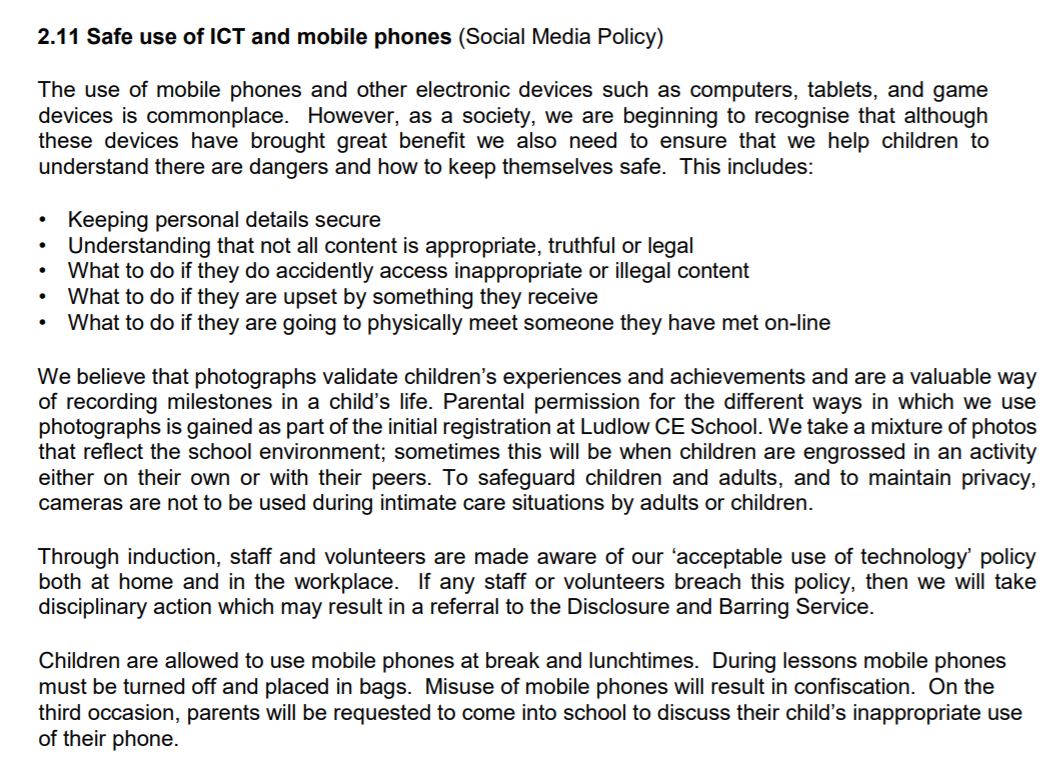
The first school I decided to contact was Ludlow CofE School. This was an easy choice for me, as - having attended this school - I feel I have a sense of rapport with them already. To start a conversation, I first look into the school's published E-Safety and Safeguarding policies. From here, I could potentially identify themes that are important to schools when discussing social media, as well as picking up on areas that they are potentially missing out on. Below is what I found...


In the grand scheme of their full policies, social media is only covering in a shockingly small section. There is not any detail on how these important things will be communicated to the students. While I understand that this is maybe expected from a policy document, I also feel like this is a little too vague, and could leave it too open to interpretation from teachers. 

Thursday, 28 February 2019

Legality Stuff

Obviously, there are a lot of restrictions and things to be wary of when working with kids. I researched this at the start of the semester to ensure that my project was even viable. All research sources are casually referenced in the Useful Links post. Below is what I found...

- DBS checks are the general requirement when working with minors in the UK.
- They are simple checks that look for any criminal history to ensure you're safe to work around children.
- There are a few different types of DBS checks that cover different things (voluntary, age levels, different lengths of time, different levels of contact).
- School visitors without checks need to be supervised at all times when around children.
- DBS checks are not necessary for short, uncommon contact with children.
- If I decided to make this project into an official, long-term plan, I would need a DBS check (should cost around £40). But for this semester, I should be fine without a check.

Wednesday, 27 February 2019

Designing My Dinosaurs Pt. 5 - Fitting Them Together


Designing My Dinosaurs Pt. 4 - The Squad! TO FINISH

I want each of the figures to serve a role in my presentations and represent something. Below will show their designs and some initial thoughts on this side of things...


Name: Poppy
Species: Triceratops
Colour: Red
Theme: 


Name: Paddy
Species: Bracheosaurus
Colour: Orange
Theme: 


Name: Patsy
Species: Pleasiosaur
Colour: Yellow
Theme: 
Comments:


Name: Percy
Species: Pteranodon
Colour: Green
Theme:
Comments:


Name: Purdy
Species: Tyrannosaurus Rex
Colour: Blue
Theme:
Comments:
Name: Perry
Species: Stegosaurus
Colour: Purple
Theme: